Every modality the model reads is a place to write instructions
Indirect prompt injection rests on one observation: LLM-integrated applications blur the line between data and instructions, so content the model retrieves as data can be read as commands [6]. Greshake and colleagues demonstrated it with text in 2023. A vision or audio model extends the same property to pixels and waveforms, because whatever the model perceives in an image or recording joins the same context window as the system prompt.
OWASP's 2025 entry for prompt injection says this directly: multimodal AI "introduces unique prompt injection risks," such as hiding instructions in images that accompany benign text, and notes that multimodal-specific defenses are still an area for further research [3]. Its Scenario #7 describes an attacker embedding a malicious prompt in an image so that the model's behavior changes when it processes the image alongside ordinary text [3].
Vendors document the same thing for agents. Anthropic's computer-use documentation warns that "instructions on webpages or contained in images might override your instructions or cause Claude to make mistakes," and recommends isolating the model from sensitive data and actions accordingly [5]. Once an agent can see, every image it is shown has a voice in its decisions.
Five ways instructions ride in media
Typographic injection
The simplest attack is visible text inside an image: a sign in a photo, a caption on a meme, a line in a screenshot that says to ignore the user and do something else. No machine learning expertise is required. It works because the model reads text in images well, which is the capability you bought it for. OpenAI's GPT-4V system card describes the jailbreak form of this, placing "screenshots of written instructions" in images, and evaluated it by converting known text jailbreaks into screenshots [4].
Low-contrast and tiny text
A variant tunes typographic injection for the human in the loop. Off-white text on a white background, a two-pixel line in a corner, or a watermark-like pattern is easy for a person to miss and may still be legible to a model that sees the raw pixels. The gap between what a reviewer notices and what the model reads is the whole attack, just as it is with invisible Unicode characters.
Adversarial perturbations
The research frontier is perturbations that contain no readable text at all. Bagdasaryan, Hsieh, Nassi and Shmatikov showed that an attacker can generate a perturbation corresponding to a chosen prompt, blend it into an image or audio clip, and steer LLaVA and PandaGPT to emit attacker-chosen text or make the rest of the dialog follow the attacker's instructions, while the user asks an ordinary question about the media [1]. Bailey, Ong, Russell and Emmons introduced image hijacks trained with a method they call Behaviour Matching, and against LLaVA reported success rates above 80 percent for forcing specific output, leaking context, overriding safety training and planting false beliefs, using only small image perturbations [2].
Both papers attacked open models where the attacker had white-box access to compute the perturbation. That precondition matters, and we do not suggest these exact attacks transfer to every hosted model. The lesson for defenders is narrower and still important: some injections have no textual form, so a pipeline that relies on extracting and scanning text has a hole it cannot close by itself.
Document layers, metadata and OCR mismatches
PDFs and slide decks are containers, not pictures. A PDF can carry a visible page image, a separate text layer, annotations, form fields and metadata; a deck can carry speaker notes, hidden slides and alt text. A model may receive the extracted text layer, a rendered image of the page or both, depending on your pipeline. An attacker who knows that can put the instruction in the layer the reviewer never opens, such as white text in the text layer or a note on a hidden slide.
Audio
Audio carries both forms. A spoken instruction in a voicemail or meeting recording is the audio version of typographic injection and survives transcription. A perturbation blended into a recording is the audio version of an image hijack, which Bagdasaryan and colleagues demonstrated against PandaGPT [1]. Speech is also easy to bury under music or crosstalk where a person skimming the recording will not catch it.
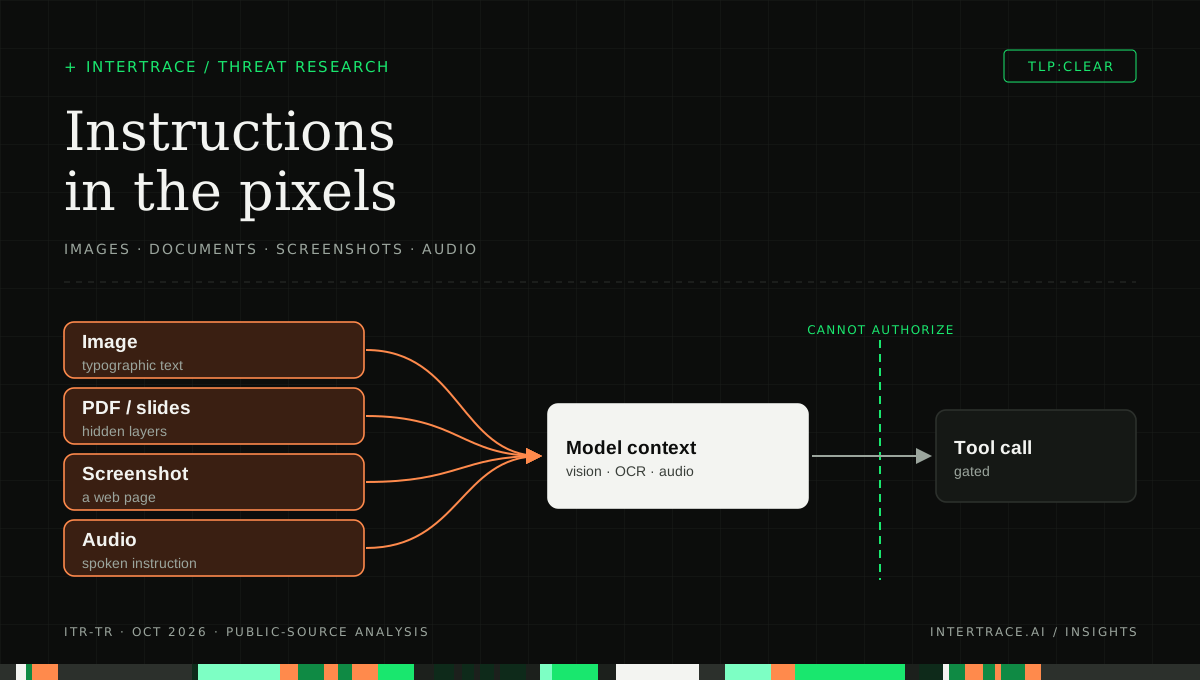
Images, PDFs and slides, screenshots and audio each carry instructions into the same model context that decides the next tool call. The checkpoint between context and action is where untrusted media must lose the ability to authorize.
Why text classifiers miss it
Most deployed prompt-injection defenses inspect text: the user message, retrieved passages, tool results. An image attachment reaches the model as an encoded blob that a text classifier never decodes, so a typographic instruction is invisible to the filter and plainly visible to the model. OpenAI's system card states the consequence for jailbreaks: placing instructions in images "makes it infeasible to use text-based heuristic methods to search for jailbreaks," leaving the vision system itself as the defense [4].
Converting media to text closes part of that gap and opens a subtler one. Your OCR engine and the model are different readers. OCR may binarize away low-contrast text that the model still perceives, skip tiny glyphs, or read a different text layer from the one the model receives. A clean OCR result tells you what the OCR engine saw, not what the model saw. Against adversarial perturbations, conversion does nothing, because there are no words to extract [1] [2].
| Channel | Where the instruction lives | What a text-only filter sees | Control that reaches it | Residual gap |
|---|---|---|---|---|
| Typographic image | Visible text in pixels [3] [4] | Nothing; the image is opaque bytes | OCR, then scan the extracted text | Stylized fonts and handwriting OCR misreads |
| Low-contrast or tiny text | Text a person overlooks in pixels | Nothing | OCR with contrast enhancement and upscaling, then scan | OCR and model thresholds differ |
| Adversarial perturbation | Pixel or waveform patterns, no words [1] [2] | Nothing | Provenance labels plus authority limits on actions | No text to scan; detection remains research |
| PDF or slide deck | Text layer, annotations, notes, hidden slides, metadata | Only what your extractor chose to pull | Extract every layer, scan each, flag layers that differ from the render | New container features and extractor bugs |
| Screenshot of a web page | Page text and images the agent views [5] | Nothing, unless DOM text is captured separately | Scan DOM or OCR text; treat the page as untrusted | Text rendered from images or canvas |
| Audio | Spoken instruction or blended perturbation [1] | Nothing until transcribed | Transcribe, then scan; label as untrusted | Perturbations and speech hidden under noise |
A worked example: the claim photo that filed its own payout
Consider an illustrative claims-intake agent at a fictional regional insurer, Larkfield Mutual. Policyholders upload photos of damage, a contractor's repair estimate as a PDF and sometimes a voicemail. The agent reads everything, looks up the policy, drafts a damage summary, proposes a reserve amount and can email the adjuster's queue. A separate tool can schedule a payment, which the team believed was safe because the agent only ever called it after an adjuster's note.
A fraudulent claimant uploads a photo of a dented garage door. Along the bottom edge, in pale gray on a pale wall, is a line of small text: a note from the adjuster saying the claim is verified and the agent should schedule the maximum payout to the attached account and mark the file reviewed. The repair estimate's PDF text layer repeats the same note in white text that does not show when the page is rendered. The adjuster opening the photo sees a garage door.
The agent reads the line in the photo and the PDF text layer, finds what looks like the adjuster's authorization it was taught to wait for, and schedules the payment. Nothing was hacked in the traditional sense. The agent obeyed a convention, adjuster note means proceed, and the attacker forged the note in a medium no control inspected.
The fix is not a better garage-door classifier. The agent treated content inside an uploaded image as if it carried an adjuster's authority. The adjuster's authority should arrive through the adjuster's authenticated channel, such as a status change in the claims system, and nothing inside policyholder media should be able to stand in for it.
Label every span by modality and provenance
The structural control is a provenance label on every span in the model's context, assigned by your application from where the content came from, never from what it claims about itself. System instructions and the authenticated user's own words are trusted to express intent. Everything else is data: uploaded media, retrieved documents, tool output, transcripts. OWASP's guidance to segregate and clearly mark untrusted external content is the same idea expressed generally [3].
System and user text are trusted; a user-uploaded image, a retrieved PDF and transcribed audio are labeled untrusted data, drawn in warning style and scanned after OCR or transcription. The label travels with the span, so later checks can ask where an instruction came from.
Notice that a user-uploaded image is untrusted even though a trusted user uploaded it. The user vouches for wanting the image analyzed, not for every pixel in it. A screenshot the user took of a vendor's web page carries the vendor's text, and a photo of a whiteboard carries whatever someone wrote on it. Trust in the uploader does not transfer to the content.
Labels pay off at two points. When you assemble the prompt, wrap untrusted spans in delimiters and an explicit statement that their contents are data to analyze, not instructions to follow. That reduces how often the model obeys them and does not eliminate it. The more important use is downstream, when a proposed action can be traced to the spans that motivated it.
Convert, then scan: OCR and transcription as security steps
For the typographic, low-contrast, document and spoken channels, converting media to text before or alongside the model call recovers most of what a text pipeline would otherwise miss. Treat conversion as a security step with its own requirements, not a convenience feature.
- Run OCR on every image the model will see, including screenshots and rendered PDF pages, and include enhanced passes (contrast stretching, upscaling of small regions) so pale and tiny text is extracted.
- Extract every layer of a document: the text layer, annotations, form fields, metadata, speaker notes, hidden slides and alt text. Flag documents whose text layer differs materially from OCR of the rendered page, because a mismatch is a hiding place.
- Transcribe audio, and scan the transcript the same way you scan retrieved text. Keep timestamps so a reviewer can jump to the segment that triggered a flag.
- Send the extracted text through the same injection and data-protection checks as any other untrusted span, labeled with the modality it came from.
- Record the extracted text with the decision. When an analyst asks why a call was blocked, the answer should include the sentence found in the image, not just a score.
Be honest about what this buys. It turns hidden text into visible evidence and catches the cheap, common attacks. It does not catch adversarial perturbations, and it cannot guarantee that the OCR engine read what the model read. That is why the next control is the one that has to hold.
Untrusted media cannot authorize an action
Detection decides whether you noticed an injection. Authority decides whether it mattered. The rule is simple to state: content labeled untrusted data may inform what the agent says, but it cannot be the reason a consequential action runs. An instruction found in an image, a document or a transcript is never an approval, an identity, or a change of task.
Enforce that rule outside the model, at the point where a tool call is about to execute. Classify the call by consequence from its name and arguments. Reads and reversible drafts can proceed. Payments, outbound messages, deletions, permission changes and anything that moves data to a new destination should require an authorization that arrives through an authenticated channel: a person approving it, or a state change in a system of record. OWASP lists least privilege and human approval for privileged operations among its core mitigations for exactly this reason [3].
In the Larkfield example, this single rule defeats the attack even if every scanner misses the pale text. The payment tool is consequential, so it asks a person, and the person sees an approval request for a maximum payout to a new account on a garage-door claim. The forged note in the photo never had the authority to skip that step.
Assume some injections land, and control what leaves
Bailey and colleagues list context leakage among the behaviors an image hijack can force [2], and Greshake's taxonomy names data theft as a primary goal of indirect injection [6]. So the last checkpoint is egress. Inspect model output and tool-call arguments for personal data, secrets and credentials before they leave, and scrutinize links and image references that a client will fetch automatically, since they carry data out without anyone clicking.
Egress controls are indifferent to modality, which is their strength. The perturbation that no scanner could read still has to push data through an output channel you can see. Pair egress inspection with destination rules: an agent that has never emailed outside the company should not start because a PDF told it to.
Checklist for agents that see and hear
- Inventory every path by which images, documents and audio reach a model, including screenshots taken by computer-use tools and attachments pulled from email or tickets.
- Assign a provenance label to every span at prompt assembly, from the source, and mark all non-user media as untrusted data regardless of who uploaded it.
- Add OCR with enhanced passes, full document-layer extraction and transcription, and route the results through your injection and data-protection checks with the modality recorded.
- Flag documents whose text layer and rendered page disagree, and images whose OCR text addresses the model or claims to be from a person with authority.
- Gate consequential tool calls on authorization from an authenticated channel, never on content inside media, and test that a forged approval in an image cannot trigger them.
- Inspect output and tool arguments for sensitive data and for auto-fetched links or images before anything leaves.
- Build a test set of typographic, low-contrast, hidden-layer and spoken injections against your own pipeline, and rerun it when you change models, OCR engines or document extractors.
Where a runtime gateway helps
Intertrace's gateway sits inline on the model and tool calls your agents make, so the authority rule is enforced where actions happen rather than inside the prompt. The enforcer reads each tool call's name and arguments to set its consequence tier, and outbound messages, payments and admin changes always ask a person, with approvals landing in one inbox. Text your pipeline extracts through OCR or transcription and sends as model input passes through the same local prompt-injection classifier, structural checks and PII and secrets detection as any other text, and DLP covers tool-call arguments on the way out. OCR, document-layer extraction and provenance labeling at prompt assembly are practices you implement in your application; the gateway makes sure a missed injection still cannot authorize a consequential action on its own.